
A payment form without WooCommerce is the simplest way to charge for one thing: a deposit, a class, a registration fee or a donation. You skip the cart, the product pages and the checkout plugin, and people pay right after they fill in the form. This guide is for teams and solo businesses. We show how it works, what it costs and how to set one up in about 15 minutes.
The short version
- A form can add up prices as people choose, then send them to Stripe or PayPal to pay.
- You do not need a shop plugin for deposits, fees, bookings or a short order.
- Card numbers stay on the payment provider’s page, never on your site.
- With Echo Forms, the free plugin takes payments and adds no fee of its own.
When is a payment form better than a shop?
When you sell one thing at a time and need details with it. A shop is built for many products, stock and shipping. A form is built for questions. If the payment comes with a date, a name, a size or a note, a form does both jobs on one page instead of two.
Good fits include:
- A deposit to hold a booking, a table or an appointment.
- A registration fee for a class, an event or a league.
- A custom order, such as a cake or a print, with choices that change the price.
- A donation, with an amount the person chooses.
WooCommerce is the right tool when you have a catalog, stock levels or shipping rules. For everything else it is a lot of setup for one button.
Our templates include deposit and quote forms you can start from, and we built each one to work as a WordPress payment form out of the box.
How does a payment form work?
The form adds up the price as people choose, then hands them to the payment provider’s own checkout. They pay there, and come back to your thank-you message. The entry in your dashboard shows it as paid, with the provider’s reference, so you can match it to your bank later.
Because people pay on Stripe’s or PayPal’s page, card numbers never touch your site. That is how you accept payments on a form safely, and it is why a Stripe form in WordPress needs no extra security plugin. That keeps you out of most of the card security rules, which the PCI Security Standards Council explains if you want the detail.
Which payment providers can you use?
With Echo Forms, the free plugin takes Stripe, PayPal, Razorpay, Mercado Pago and Paystack, plus cash and bank transfer for people who pay in person. Signature adds Square, Authorize.Net, Converge from Elavon, your WooCommerce checkout and payments that repeat every week, month or year.
| Provider | Good for | Free in Echo Forms |
|---|---|---|
| Stripe | Cards in most countries, and the wallets your Stripe account allows | Yes |
| PayPal | People who prefer to pay with a PayPal account | Yes |
| Razorpay | Businesses in India | Yes |
| Mercado Pago | Latin America | Yes |
| Paystack | Nigeria, Ghana, Kenya and South Africa | Yes |
| Cash or bank transfer | Paying at the desk or by invoice | Yes |
How much does a payment form cost?
You pay your payment provider’s fee, such as Stripe’s, on each payment. Some form plugins add their own share on top in their free versions, from 1.9% to 3%. Echo Forms adds nothing, in the free plugin or in Signature, so a $100 deposit costs you only what your provider charges.
How to set up a payment form, step by step
- Open Echo Forms > Connections > Payments and switch on Take payments on forms.
- Choose Test mode, pick your currency, and connect Stripe or PayPal with the keys from their dashboard.
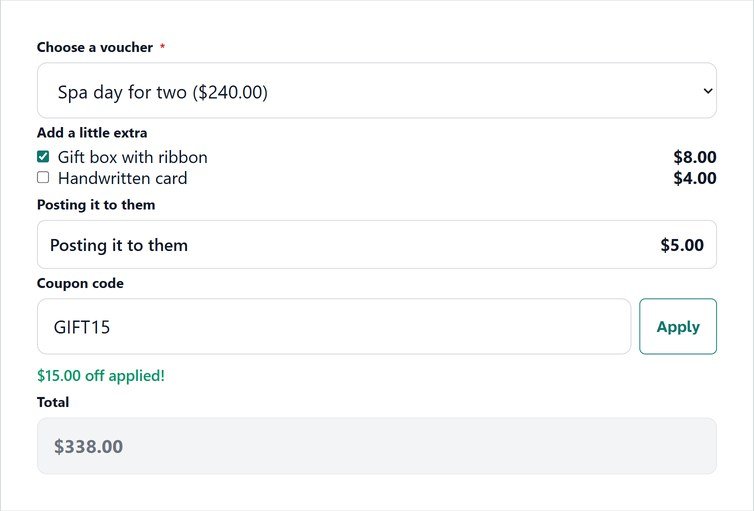
- Build the form, or start from a template, and add the prices: a Single item and a Total are free. Priced checkboxes and dropdowns, a Calculator and coupon codes come with Signature.
- On the form’s Settings > Confirmations, set the confirmation type to Collect payment.
- On Settings > Payments, tick the ways this form takes.
- Send a test payment, check the entry shows as paid, then switch to Live.
The whole setup takes about 15 minutes. The payments guide and the prices and totals guide cover every setting.
Can people pay in person instead?
Yes. Switch on cash or bank transfer for the form, and add your instructions, such as Pay at the front desk when you arrive. Those entries arrive as unpaid, and you mark them paid from the entry when the money comes in. It suits salons, clinics and classes where many people still pay at the door.
What about refunds and receipts?
Refunds happen in your provider’s dashboard, where the payment lives. For receipts, send a confirmation email from the form with the total in it, and Stripe or PayPal sends its own receipt too. A notification can also wait, such as 60 minutes, before it goes, which turns a receipt into a friendly follow-up.
A payment form without WooCommerce is enough for most small businesses that charge for a service. Start in test mode, take one real payment of your own, and you will know within 1 day whether it fits.
Take your first payment this week
Echo Forms takes Stripe, PayPal, Razorpay, Mercado Pago, Paystack, cash and bank transfer for free, with no fee from us.



