
A multi-step form in WordPress splits one long form into a few short pages, with a progress bar that shows how far people have come. It is the easiest fix for an application, an intake or a quote that asks a lot. This guide is for teams with a long form that people abandon. Drawing on what works on our own forms, we cover when steps help, how to split them and how to set them up in about 10 minutes.
The short version
- Use steps when a form has more than about 10 fields, or clear groups of questions.
- Put the easy questions first and the personal ones later.
- Name each step, so the progress bar tells people what is next.
- Multi-step forms are free in Echo Forms, with a progress indicator.
Why do multi-step forms work?
Because a short page looks easy, and a started form is more likely to be finished. Usability researchers call this pattern a wizard, and it suits any task done once, in order. People commit a little at a time. By the third step they have put in effort they do not want to waste, so they push on to the end instead of closing the tab.
Steps also help on phones. A 20-field form takes about 3 minutes to fill in and is a long scroll on a small screen, while 4 pages of 5 fields each fit comfortably, with the button always close at hand.
When should you use steps?
Use them when one of these is true:
- The form has more than about 10 fields.
- The questions fall into clear groups, such as You, Your home and When.
- Some groups only matter to some people, which conditional logic can skip.
- The form takes payment at the end, and you want details settled first.
Do not use steps for a 3-field contact form. Splitting a short form just adds clicks.
How should you split the questions?
Group by topic, and order by effort. Start with what is easy and low risk, end with what is personal or takes thought:
| Step | Put here | Example |
|---|---|---|
| 1 | Quick choices | Which service do you need? |
| 2 | The details | Size, dates, preferences |
| 3 | Contact details | Name, email, phone |
| 4 | Check and send | A summary of every answer |
Asking for the email address later surprises some people, but it works. By step 3, people have seen what they get, so handing over contact details feels like a fair trade.
How to build a multi-step form, step by step
- Build the form as one page first, with every field in order.
- Add a Page break field wherever a new step should start.
- Give each break a step title, such as Your details, which shows in the progress indicator.
- Change the Next button text where it helps, such as Continue to payment.
- With Signature, add an Entry preview field on the last step, so people check their answers.
- Preview the form on a phone and click through every step. That test takes about 5 minutes, and we never skip it.
The layout and steps guide covers page breaks, the progress indicator and the preview field.
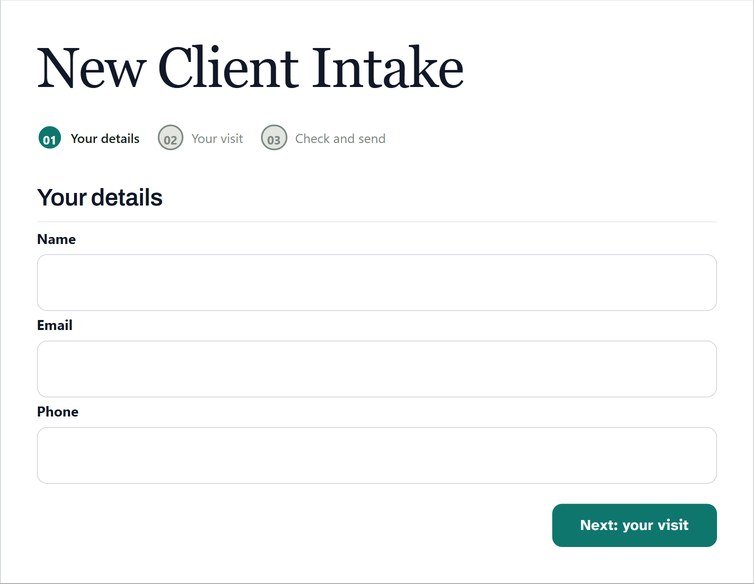
Should the progress bar show steps or a percentage?
Show named steps when you have 3 to 5 of them, because names tell people what is coming. A plain bar or a percentage suits longer forms, where a list of 8 names would crowd the top of the page. Either is better than nothing: people stay longer when they can see the end. A WordPress form with steps and a progress bar form are really the same idea, and both are aimed at long form completion.
What if people stop half way?
Some always will. Two Signature features help you keep them. Save and resume gives people a link back to exactly where they stopped, which suits forms that need a document or a second opinion. Form abandonment emails people who leave part way, after a delay you choose, such as 60 minutes, with a link to pick up again. Read more in save and resume.
Do multi-step forms hurt SEO or speed?
No. The whole form loads once, and the steps change in the browser, so there is no extra page to load between them. Search engines see the page around the form as usual.
A multi-step form in WordPress is one of the cheapest wins for a long form. Split it into named steps, keep the hard questions for later, and test it on a phone before you share it.
Split your long form tonight
Multi-step forms with a progress bar are in the free version of Echo Forms.



