Echo Forms features
Signature

Save and continue later, for forms that take a while.

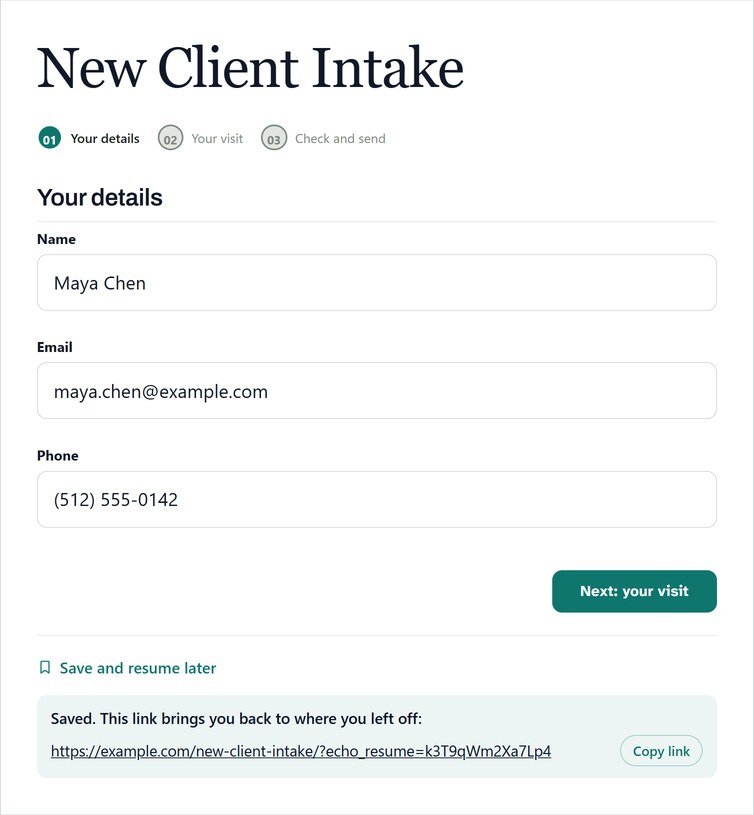
A save and continue form lets people stop at any point and come back later. The phone rings, a detail is missing, the tab gets closed: with Save and resume later, they save their progress and get a link back to exactly where they left off.
Back where they were

Save now, finish later, right where they left off.

Save and resume later puts a quiet button under the form. Press it and they get a private link back to their answers, ready to copy. Choices, uploads and drawn signatures come back too.

Saved progress is kept for 30 days

Never shown under Entries until it is sent

Works on long applications and intakes

Feat save and continue saved link r1025
Feat save and continue email people who leave without sending r1025
A nudge for those who leave

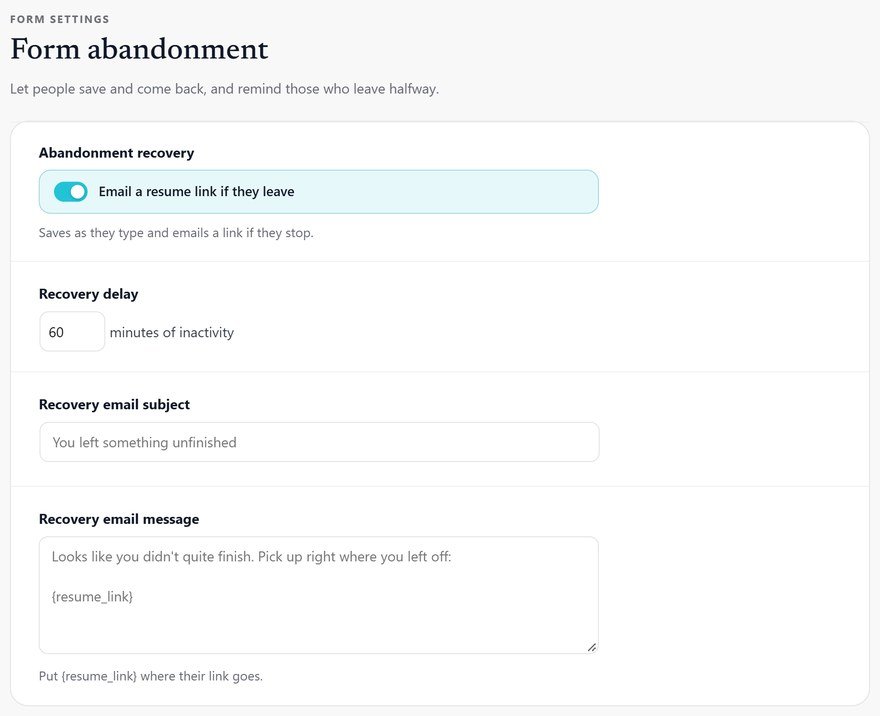
An email with their link, if they go quiet.

Switch on Email a resume link if they leave, and anyone who stops for longer than your delay gets their link by email, at the address they typed.

A delay you choose

Your own subject and words

{resume_link} wherever you want it

Everything in save and resume.

What it does, a line each, so you can check it does what you need.

A save button

Under the form, never competing with sending it.

A private link

Back to their answers, with a button to copy it.

Everything comes back

Answers, choices, uploads and drawn signatures.

Kept for 30 days

Then cleared, unless they send it.

Not an entry yet

Saved progress stays out of Entries until it is sent.

An email if they leave

Their link, sent after the delay you set.

Your own words

The subject and message are yours, with {resume_link}.

Cleared once sent

Finishing the form clears the saved copy, so no reminder follows.

Any device

Start on a phone, finish on a computer: the link works on both.

Set it up

How to let people save a form and resume later.

Ideal for teams with long applications, claims or intake forms in WordPress. It takes about 2 minutes to switch on, and saved progress is kept for 30 days, so nobody has to start again. Losing typed answers to a timeout is a known problem that WCAG’s timeouts guidance covers.

01

Switch it on

Open the form’s Settings > Form abandonment and tick Save and resume later.

02

Publish the form

The resume link needs the form on a published page; until then, people are asked to come back to the same page.

03

Add a reminder

Tick Email a resume link if they leave, so anyone who goes quiet gets their link by email after the delay you set.

04

Try it

Fill in half the form, save it, and open the link in Chrome on your phone: answers, files and signatures come back.

Questions, answered.

For 30 days, then it is cleared. It becomes an entry only when the form is sent.

Yes. Uploaded files and drawn signatures are added again when they open their link.

Yes. Email a resume link if they leave sends them a link back to their answers after the delay you set.

Save and resume later and unfinished-form emails come with Echo Forms Signature.

Nobody starts over.

Echo Forms is free, with every field, logic and payments, and we add no fee to your payments. Signature adds 60 more features, from $49.99 a year, and you have 14 days to ask us for a refund.

Get Echo Forms, free

Every field, logic and payments, with no limit on forms or entries. We email you the download and three setup steps.

The download link and three setup steps come to your inbox.