Echo Forms features
Signature

A WordPress quiz builder with a result made for each person.

Echo Forms Signature is a WordPress quiz builder that scores the answers and shows a result you design: a plan with a chart, a product match, a personality type, or a pass mark with every answer reviewed. Five finished quizzes are ready to change.

Points

Answers add up and the total picks the result.

Right or wrong

A pass mark, with each answer reviewed.

Personality types

The type with the most wins.

Five templates

Questions, screens and results already built.

How it scores

Pick points, right answers or types.

Tick Make this form a quiz and choose how it scores. Four steps across the top say how far along it is, and Try it opens the real quiz in test mode.

Points for product finders

Right or wrong for tests and trivia

Types for “which one are you?”

Feat quizzes make a form a quiz r1025
Feat quizzes results r1025
Results

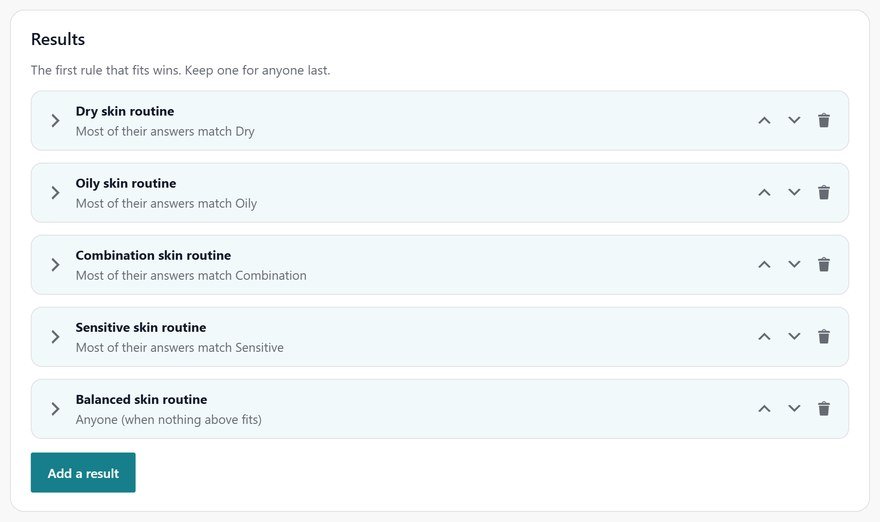
Results checked from the top, so every score has a home.

Each result has a rule, and the first one that fits is what they see. Starter results split the real range of scores for you, and an amber note warns about any score with no result.

Starter results to begin from

A warning for a score with no result

One for anyone, last

Screens between questions

A moment between questions that keeps them going.

An Answer screen reacts to what they just said, and a Loading screen ticks through steps before the result, so it feels worked out for them.

A reply to the answer they gave

A loading screen before the result

Tips and short lists

Feat quizzes screens between questions r1025

Everything in quizzes.

What it does, a line each, so you can check it does what you need.

Three ways to score

Points, right or wrong, or personality types.

A pass mark

Every answer reviewed, right or wrong, at the end.

A note after a question

Explain the right answer the moment they give it.

Starter results

Results that split the real range of scores, ready to rename.

A result builder

Pictures, headings, charts, steps and product picks, block by block.

A live preview

The result as they will see it, while you build it.

Answer and loading screens

A reply between questions and a moment before the result.

Five quiz templates

Questions, screens and results already built.

Results everywhere

On each entry and in your emails, with the score and type.

Set it up

How to build a quiz in four steps.

Ideal for teams turning a form into something people want to finish: a personality quiz, a product recommendation quiz or a knowledge check in WordPress. Our templates take about 20 minutes to make your own, because the questions, screens and results are already built.

01

Start from a template

Open New form > Quizzes and pick one of the five, or tick Make this form a quiz on any form’s Settings > Quiz tab.

02

Choose how it scores

Points for plans and product finders, right or wrong for tests, or personality types for “which one are you?”

03

Score answers, add results

Score every answer in one list, then give each result a rule. Product picks can come from WooCommerce, with Add to cart.

04

Try it

Save, then press Try it to take the real quiz in test mode in a new tab.

Questions, answered.

Three: points that add up to a result, right or wrong answers with a pass mark, and personality types where the type with the most answers wins.

Yes. A result is built from blocks, including pictures, charts and product picks, and you see it as visitors will while you build it.

Yes. Each entry shows a Quiz card with the result, the score, the type, the right answers and whether they passed, and emails can include it.

Yes. New form > Quizzes has five quiz templates with their questions, screens and results already built.

Quizzes people want to finish.

Echo Forms is free, with every field, logic and payments, and we add no fee to your payments. Signature adds 60 more features, from $49.99 a year, and you have 14 days to ask us for a refund.

Get Echo Forms, free

Every field, logic and payments, with no limit on forms or entries. We email you the download and three setup steps.

The download link and three setup steps come to your inbox.