
Conditional logic in WordPress forms lets a form change as people answer it. A question appears only when an earlier answer calls for it, so nobody wades through fields that do not apply to them. This guide is for beginners and busy teams. We explain how the rules work, walk through five real examples and cover the mistakes that make logic confusing.
The short version
- A rule watches one answer and shows or hides another field when it matches.
- Use logic to shorten forms, not to make them clever.
- Start with “show this field if”, because hidden-by-default fields are easier to follow.
- In Echo Forms, conditional logic is free on every field.
What is conditional logic in a form?
It is a rule that says “show this field if that answer is this”. The rule watches one field, compares its answer, and shows or hides another field. Logic does not change what people can send. It only changes what they see, so the form feels shorter and more personal.
Most rules use one of a few tests: is, is not, contains or is empty. With those four you can build almost any form a small business needs. The idea has a name in design circles, progressive disclosure: show people only what they need, when they need it.
Why use conditional logic?
Because shorter forms get finished. Good logic can cut a 4 minute form down to 2 minutes for most people, and every field that does not apply to them is a reason to stop. Logic also gives you cleaner entries, since nobody types “N/A” into a box that was never meant for them.
If 200 people a month fill in your quote form, that time adds up quickly. There is a second benefit. One smart form can replace three separate ones, so you have one set of emails, one list of entries and one page to keep up to date.
Five examples you can copy
| Form | The rule | What it saves |
|---|---|---|
| Contact | Show Order number if Topic is An order | Order questions arrive ready to look up |
| Quote | Show Number of floors if Property is House | Apartment owners skip a question that does not fit |
| Event | Show Dietary needs if Staying for dinner is Yes | The kitchen gets a clean list |
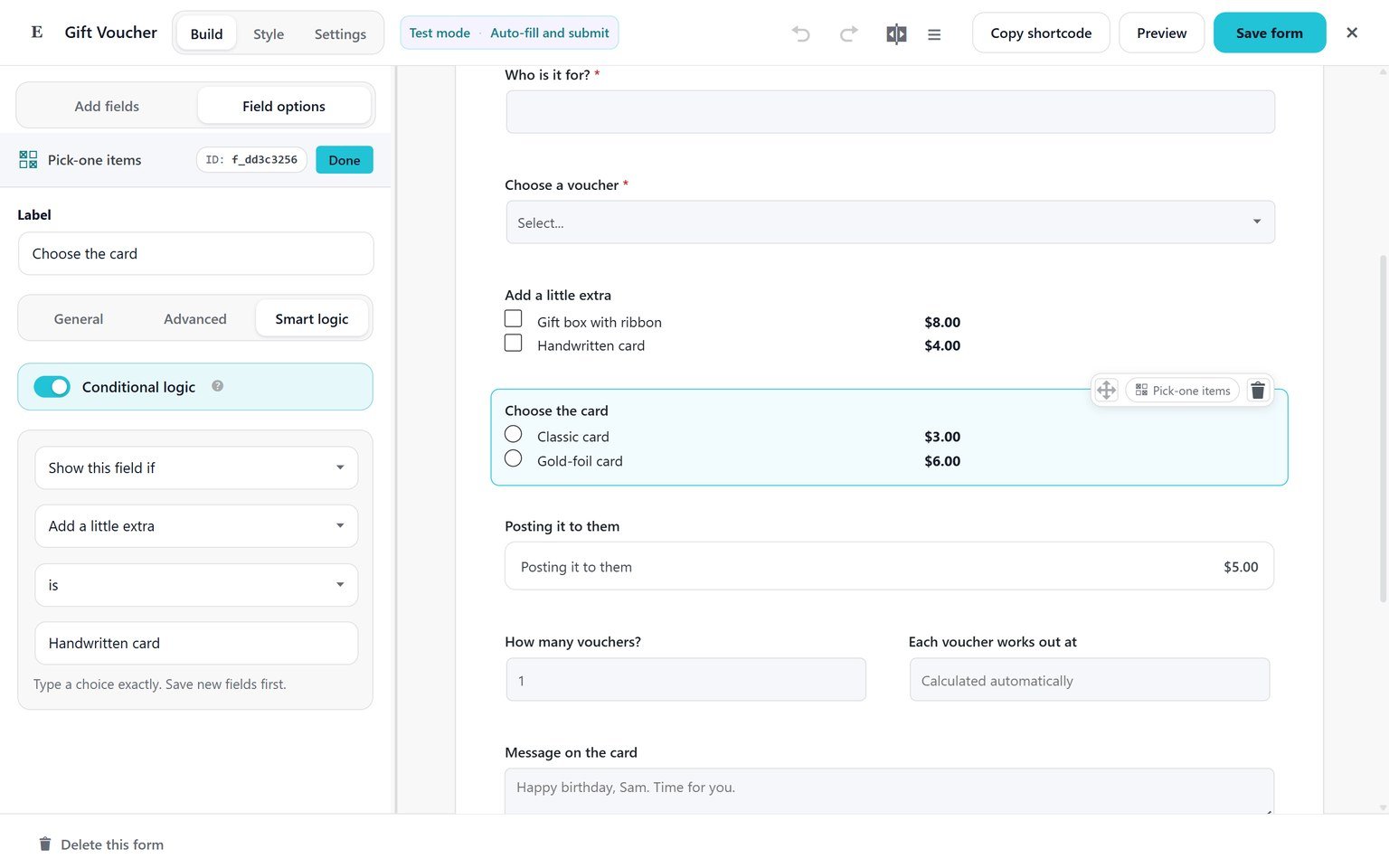
| Gift voucher | Show Card choice if Add a little extra is Handwritten card | Only card buyers pick a card |
| Job application | Show Portfolio link if Role contains Design | Each role gets the right questions |
How to add conditional logic, step by step
In Echo Forms the rules live on each field, under its Smart logic tab. Here is the “how did you hear about us” example from our guide:
- Add a Multiple choice field called How did you hear about us? with Google, A friend and Other.
- Add a Text field below it called Where did you hear about us?, then save the form.
- Click the text field and open its Smart logic tab.
- Switch on Conditional logic and choose Show this field if.
- Pick How did you hear about us?, choose is, then type Other.
- Save, then press Preview and pick Other to watch the field appear.
The field options guide shows every logic setting. It takes about 5 minutes to add a first rule.
Can logic change emails and messages too?
Yes, with Echo Forms Signature. The thank-you message can change by answer, such as a different next step for each service, and each email can send only when an answer matches. That way sales questions go to sales and billing questions go to billing, from one form. The guide to emails for each entry shows how to route them.
What are the common mistakes?
Logic goes wrong in a few familiar ways. Check for these before a form goes live:
- Hiding required fields. A hidden field should never block sending. Echo skips hidden fields when it checks what is required, but test it anyway.
- Rules that chain too deep. If field C depends on B, which depends on A, people get lost. Keep it to 2 levels.
- Logic instead of steps. If half the form changes, split it into multi-step pages instead.
- No test. Preview the form and try every path, which takes about 10 minutes on a busy form.
The same rules work wherever the form shows: in Elementor, in Gutenberg or in a popup.
Does conditional logic slow a form down?
No. The rules run in the visitor’s browser as they answer, so the form changes instantly and there is no wait for the server. The only time the server checks is when the form is sent, to make sure hidden fields are ignored.
Conditional logic is one of the best ways to make a form feel short without asking for less. Start with one rule on your busiest form, then add more where people get stuck. You can try a form with live logic on our home page before you build your own.
Make your form read the answers
Conditional logic is in the free version of Echo Forms, on every field, with no limit on rules.



