
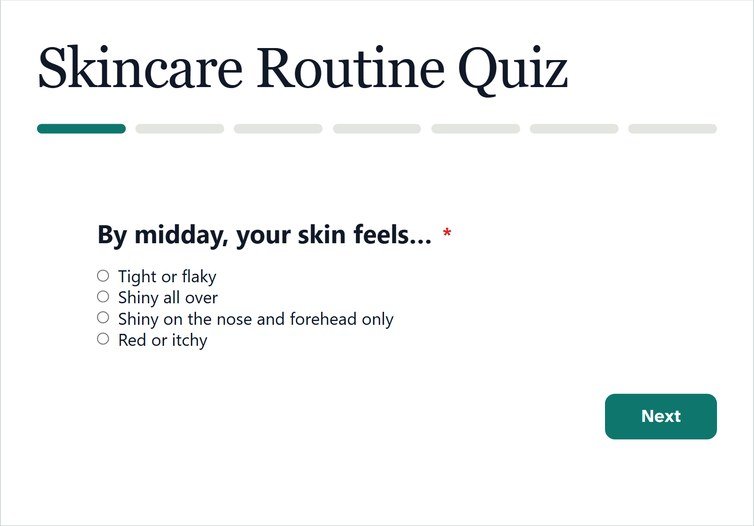
Conversational forms show one question at a time, large and centered, with a button to go on and one to go back. The same questions feel like a short chat instead of a page of boxes. This guide is for teams who want more people to finish a long form, and for beginners trying the style for the first time. We cover when it works, how to write for it and how to set one up in about 5 minutes, then spend 10 minutes rewriting the labels.
The short version
- One question per screen makes a long form feel short.
- Write each label as a question, and use the description for a short reason.
- Keep it to forms where each answer is quick: choices, short text, a date.
- In Echo Forms, it is one switch, and logic and steps still work.
Why do conversational forms work?
Because each screen asks for one small thing. People answer quickly, press on and see progress, so the form never looks like work. A 12-question form takes about 3 minutes either way, but one question per screen makes each of those minutes feel lighter. The Nielsen Norman Group makes the same point about forms in general: fewer things on screen means fewer decisions at once. The style became popular with hosted tools, which is why people often call it a “Typeform style form”. You do not need a hosted tool for it, though. A conversational form in WordPress keeps the entries on your own site.
It also helps on phones. One question fills the screen, the keyboard covers nothing important, and the button is always in reach.
When should you use a conversational form?
When the questions are quick and personal. It shines for:
- Questionnaires, such as a wedding or event brief.
- Lead forms with a few qualifying questions.
- Surveys where each question deserves attention.
- Quizzes, where pace adds to the fun.
It suits long forms of quick answers, not long answers. A form that needs a 300-word description, or 3 documents, is better as a multi-step form with a few fields per page.
How do you write a form that reads like a conversation?
Write it the way you would speak. These four habits make the biggest difference:
- Ask, do not label. What should we call you? reads better than Name.
- Give a reason. Use the description for a short why, such as So we can say hello properly.
- Start easy. Put the light questions first and the email address near the end.
- Use cards for choices. A question with 3 or 4 answers becomes one tap and on to the next.
How to set up a conversational form, step by step
- Install Echo Forms Signature next to the free plugin.
- Open the form and go to Settings > Conversational form.
- Tick Show one question at a time and save.
- Rewrite each label as a question.
- Preview the form on a phone and step through it.
Every field gets its own screen with Next and Previous. Page breaks are ignored while it is on, and hidden fields take no step of their own. The conversational forms guide covers every option.
Does conditional logic still work?
Yes. Show or hide rules still apply, so a question hidden by an earlier answer is simply skipped. The progress indicator counts only the questions people will see, so it stays honest about how far they have to go.
Can a conversational form go in a popup?
Yes. It works wherever the form is: on a page, in a popup or on its own landing page. A landing page suits it best, because the whole screen belongs to the conversation.
Are conversational forms better for every form?
No. For a short contact form with 3 fields, showing everything at once is faster. Conversational forms win when a form has 6 or more quick questions and people need a little encouragement to finish. Try both on your busiest form for 2 weeks, about 14 days each, and compare how many people send each version. Aim for a conversation that takes under 3 minutes. Unlike a redesign, switching back is one click.
Turn any form into a conversation
Conversational forms come with Echo Forms Signature, with one switch on any form.



