
Connect a service once under Connections, then switch it on for each form here. Nothing on Connections changes a live form on its own.
Add people to a mailing list
Tick Add to a mailing list and choose:
| Setting | What it does |
|---|---|
| Provider | Any mailing list connected on Connections: Mailchimp, Kit, MailerLite, Brevo, ActiveCampaign, GetResponse, SendGrid, AWeber, Constant Contact, Klaviyo, Drip, Campaign Monitor or MailPoet. |
| List / audience | Which list they join. |
| Email address comes from | The form’s email field. |
| First name comes from and Last name comes from | Optional, for a list that greets people by name. |
| Only add people who tick | A Consent checkbox, GDPR agreement or Toggle switch on the form, such as Send me the newsletter. Only people who tick it are added. Left on No box, everyone who sends the form is added. |
Asking first is good manners, and the law in many places. Add a Consent checkbox, then pick it in Only add people who tick.
Copy each entry into a Google Sheet
Under Send each submission elsewhere, switch on Google Sheets (Add each entry as a row) and give:
- Spreadsheet ID: the long ID in the spreadsheet’s own URL, between /d/ and /edit.
- Sheet/tab name: the tab the rows go on.
Share the spreadsheet with the service account address shown on Connections, as an Editor. See Connections.
Your CRM
The CRM card creates or updates a contact in HubSpot, Salesforce, Pipedrive or Zoho CRM for every real submission. Tick Send to a CRM 1 and pick the CRM 2. It sends the fields linked to the customer’s email and name in each field’s Links to booking field option.

ReefCRM, on the same site, needs no card: every entry lands on the person’s timeline on its own. See With Pulse Bookings and ReefCRM.
Slack
The Slack card posts each submission to a channel. Tick Post to Slack 1, make a free Incoming Webhook for the channel at api.slack.com/messaging/webhooks, and paste its Incoming webhook URL 2.

A webhook
The Webhook card sends each submission to a web address as JSON: Zapier’s Catch Hook, Make’s Custom Webhook, n8n’s Webhook node, or your own system.

- Tick Send to a webhook.
- Webhook URL: where it goes.
- Custom JSON body (optional): left blank, every field is sent as flat JSON. To match another system’s shape, write your own body with
{field:ID}tokens inside quotes. A field’s ID is next to its label on the Build tab. - Only send when: leave it on Always, or pick a field to send only the entries that match, such as Department is Sales.
For a two-way link with Zapier, Make or n8n, see Automation apps.
Uploaded files to Google Drive or Dropbox
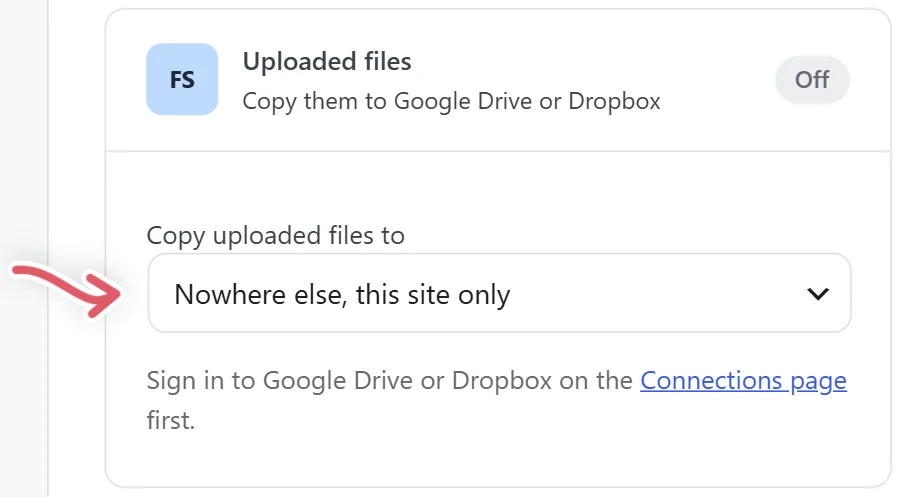
Uploaded files: Copy uploaded files to Google Drive or Dropbox. Each file goes into an Echo Forms folder, in a folder named for this form, a moment after the form is sent. The entry notes where it went, and the file stays on this site too. Sign in to Drive or Dropbox on Connections first.
An event in Google Calendar
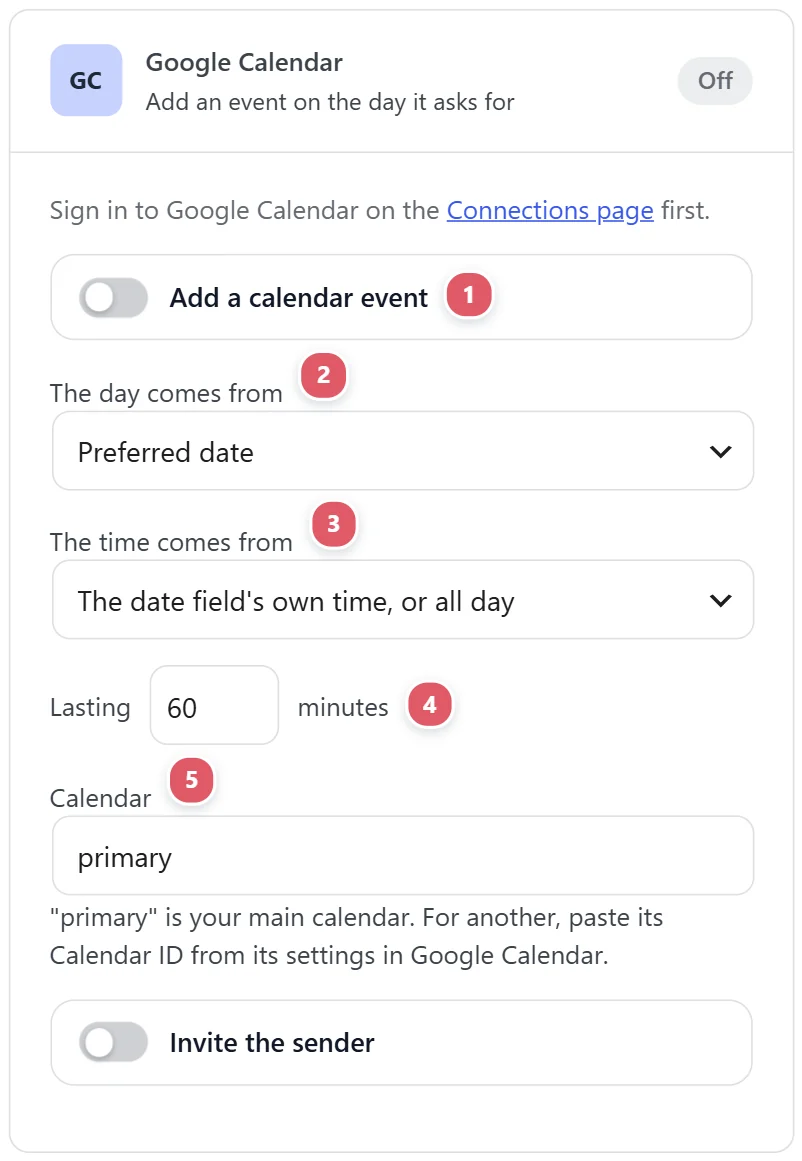
Google Calendar adds an event for every real submission, on the day it asks for. The form needs a Date field.
| Setting | What it does |
|---|---|
| 1. Add a calendar event | Switches it on for this form. |
| 2. The day comes from | The Date field. |
| 3. The time comes from | A Time field, or the date field’s own time, or all day. |
| 4. Lasting | How many minutes. |
| 5. Calendar | “primary” is your main calendar. For another, paste its Calendar ID from its settings in Google Calendar. |
| 6. Invite the person who sent it | By the email they gave. |
The event is named for the form and the person, with their answers in it, and the entry notes it.
A row in Notion or Airtable
Notion or Airtable adds a row for each entry. Pick which in Add a row in 1, paste the Database or table link 2 from your browser’s address bar, and save. Its columns then appear, each matched to a question by name until you pick one, or Do not send.

The CRM, Slack, webhook, file storage, calendar and database cards come with Echo Forms Signature. Mailing lists and Google Sheets are free.
Support comes with Signature: in Echo Forms, open Help & feedback and tell us what you were doing, and the people who build it answer, seven days a week. Get Signature